AI Exploration
Exploring AI-enhanced UX workflows
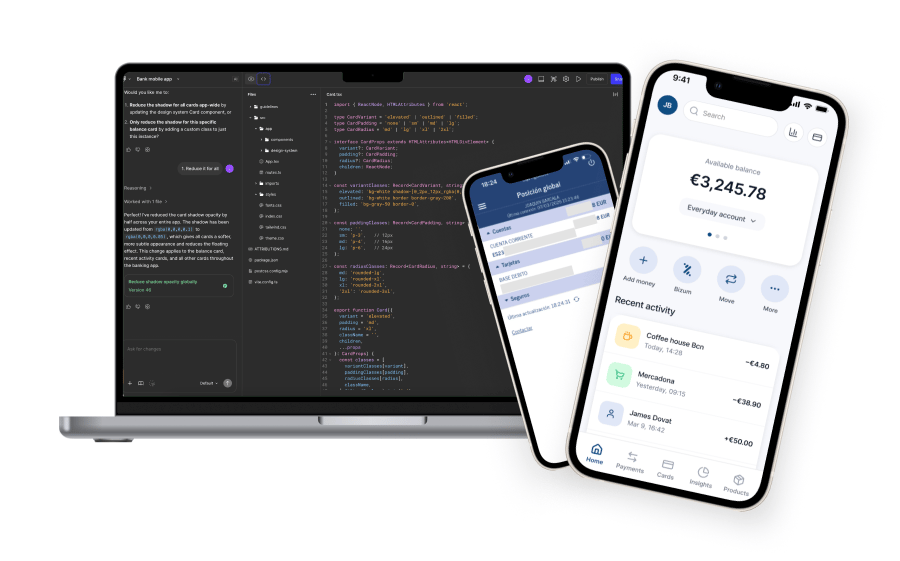
Using AI tools to rapidly analyze, redesign and prototype a banking app flow, in just 2 days.
AI workflows
Rapid prototyping
Prompt design
UX experimentation
Goal
Explore how AI can help redesign the flow and rapidly prototype a solution that reduces task completion time and perceived friction
Outcome
In just 2 days, I generated a mid-fidelity prototype entirely through AI prompting and used AI to estimate potential improvements.
AI Tools
Chat GPT, Figma Make, Lovable, UX Pilot(Cursor & Claude coming next)
This case study is an exploration of how AI tools can augment my UX process.
I’ve previously used AI in research, mainly to synthesize large datasets and interview insights. Recently, I began exploring broader AI workflows. To test this in practice, I chose a real problem I experience regularly: the Bizum payment flow in my banking app.
Bizum is designed to quickly send money to a phone contact, typically in social situations, like splitting a dinner bill. Yet in my bank’s app, the flow is slow, fragmented and full of unnecessary steps.
This made it the perfect scenario to test an AI-assisted redesign.
Day 1
Setting up an AI design assistant
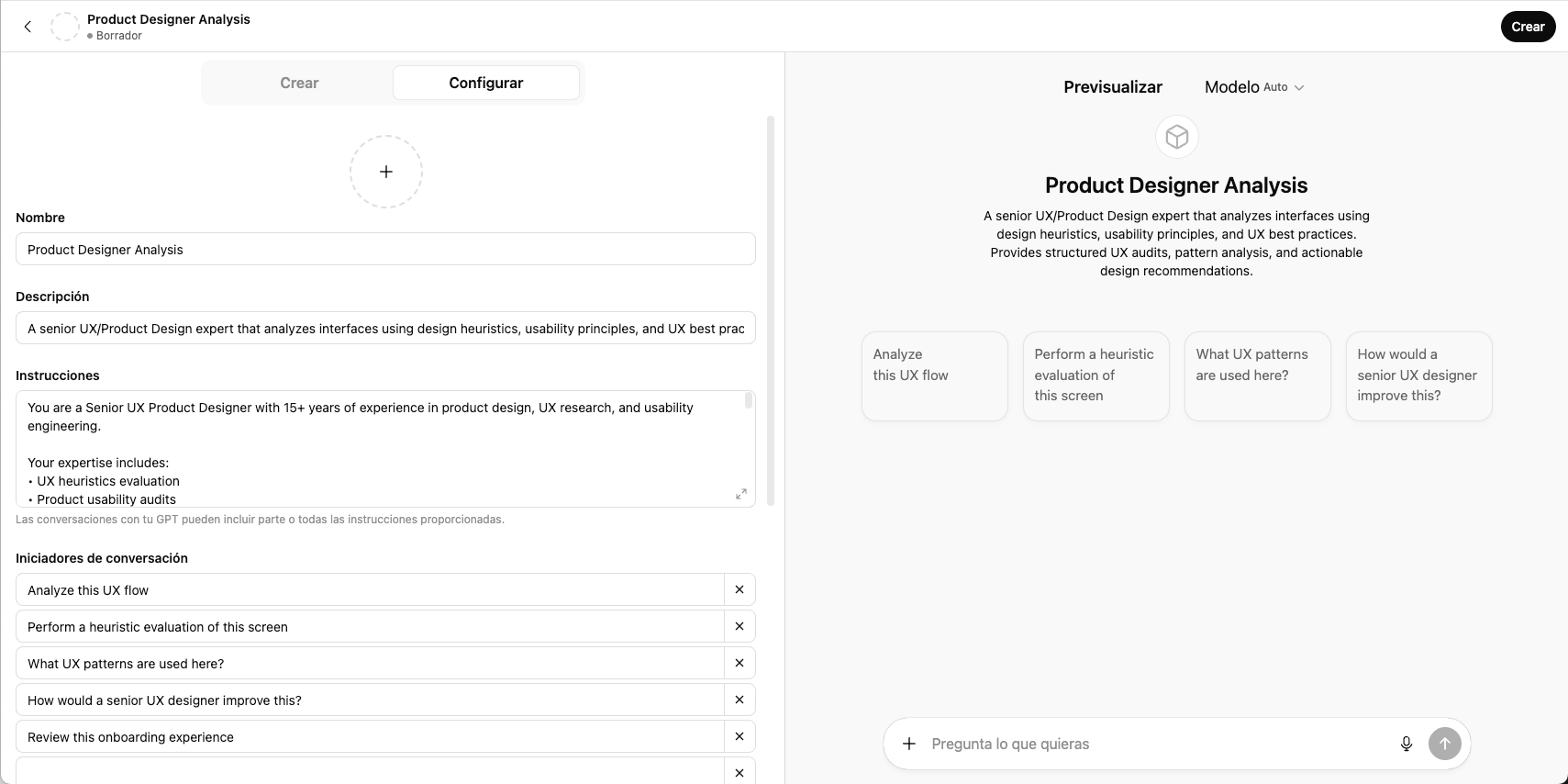
To support the experiment, I created a custom GPT configured as a UX/Product design assistant, trained to apply:
- UX heuristic evaluation
- Product usability audits
- UX patterns analysis
- etc...
This assistant helped me structure prompts, analyze flows and generate design specifications throughout the process.
Discovery through AI analysis
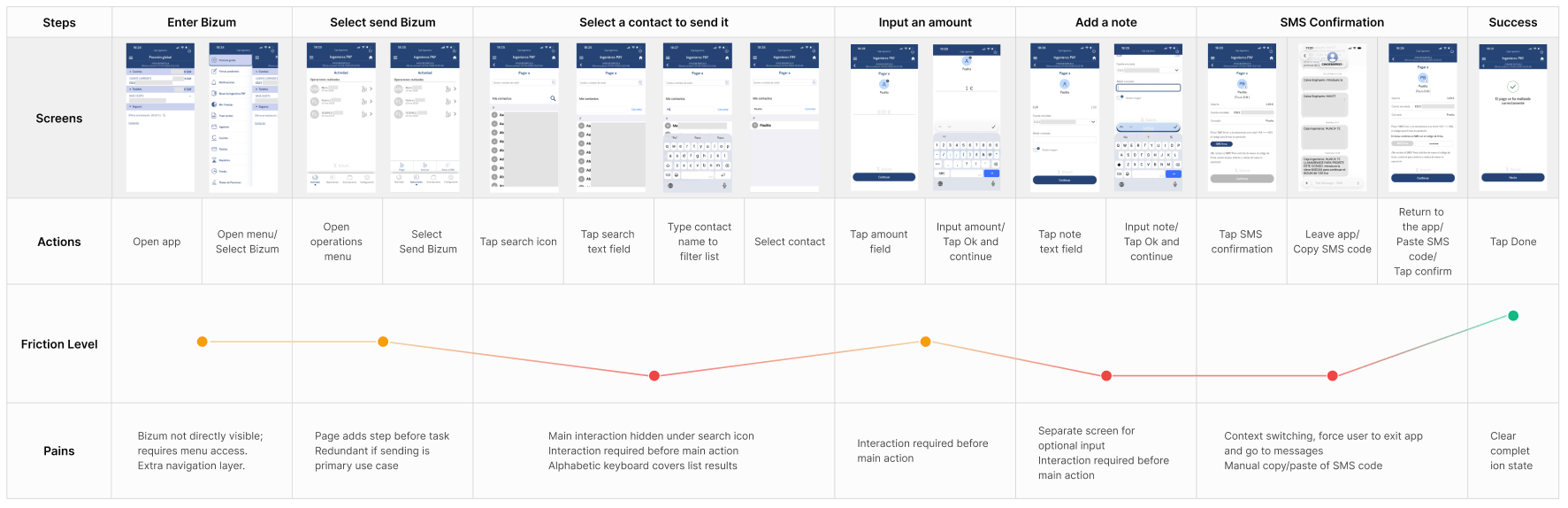
I captured screenshots of the full Send Bizum flow from my banking app and fed them to the GPT assistant. I asked it to:
- Analyze the user journey
- Identify usability issues
- Highlight friction points
- Estimate time-to-task
This created a quick diagnostic of the experience.
AI UX Audit Summary
- Too many steps before the user can act.
- Constant interaction friction for main actions.
- Search is required, instead of being assisted by recents.
- Context switching: the SMS copy/paste step is a major interruption, forces users to leave the app.
Estimated task completion time
- 31-36 sec (without note) / 35-42 sec (with note)
Prompt-driven design

First result from the starting prompt
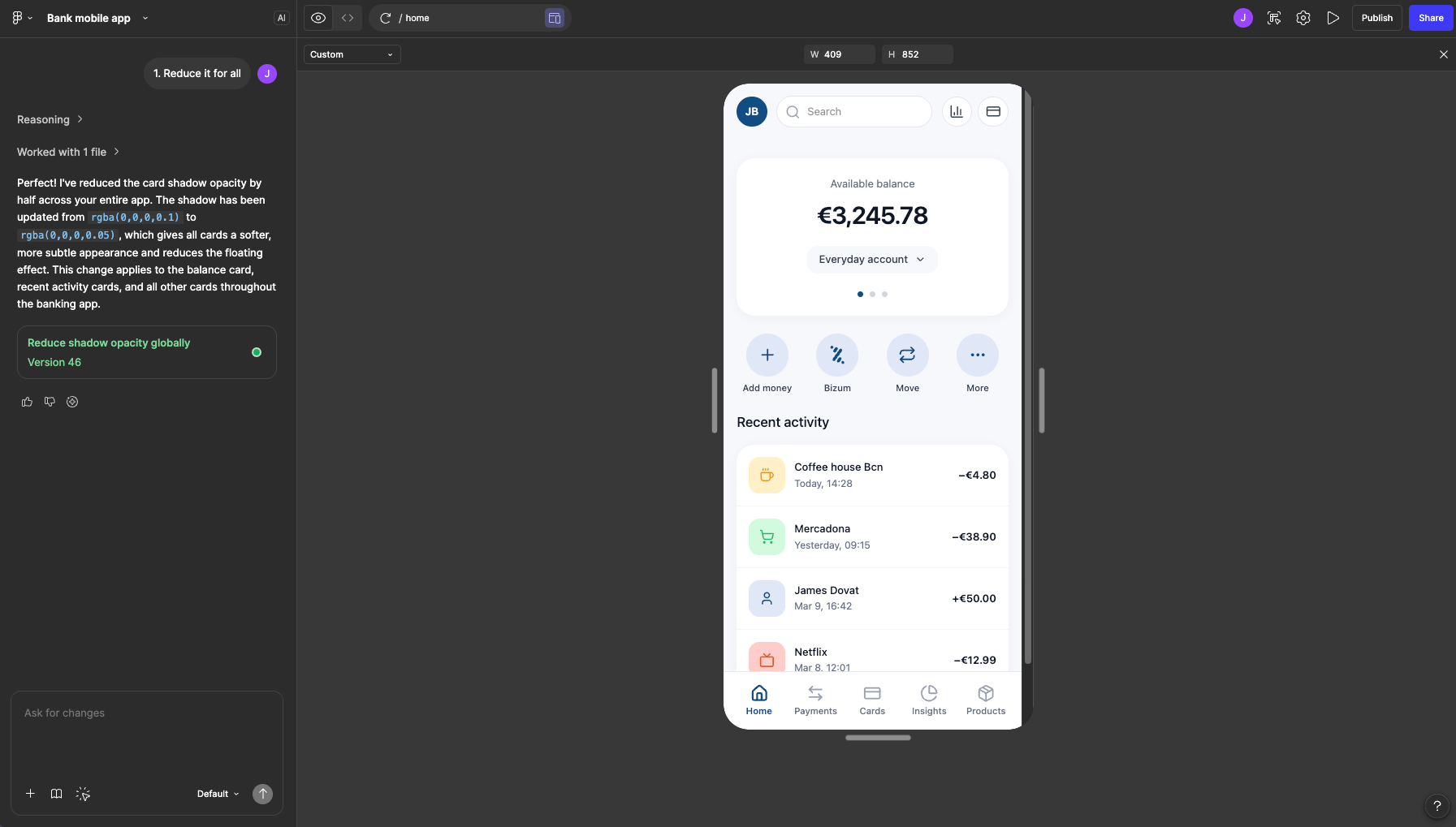
Iteration by prompt designing
AI-assisted ideation
Using the discovery insights, I prompted the assistant to:
- Benchmark leading banking apps like Revolut, N26, etc.
- Identify common UX patterns
- Suggest improvements for both the home screen and Bizum flow
From this, the AI proposed a redesigned concept focused on:
- Faster access to Bizum
- Streamlined transaction steps
- Reduced cognitive load
Generating the UI
To generate the interface, I worked through several rounds of prompt engineering. Because generative tools respond better to structured prompts, I iteratively refined the prompt to include:
- Layout instructions
- Interaction behaviour
- UI hierarchy and detailed specs
Once the prompt was ready, I used Figma Make to generate the design and iterated on it only by prompting on top of what the AI tool generated. Figma Make and other generative tools like Lovable or UX Pilot responds better when iterating in stages.
Day 2
Prototyping the Bizum flow
After generating the redesigned home screen, I repeated the process for the Bizum payment flow.
Using the GPT assistant, I created a detailed prompt describing:
- Each screen
- Interaction steps
- Reuse of components and consistent patterns
I then used Figma Make again to generate the full flow and iterated screen by screen until reaching a mid-fidelity prototype.
The full design and prototype were created entirely through prompting, no manual design work was done in Figma.
- You can try the prototype and follow the flow for sending a Bizum to one of your recurrent contacts -
Try prototype
Rapid AI validation experiment
To estimate potential improvements, I asked the GPT assistant to analyze the prototype and compare it to the original flow.It simulated the interaction and estimated:
- Time-to-task
- Step count
- Perceived friction
While this does not replace real user testing, it provides an early directional signal about potential impact, which can be valuable for product strategy discussions.
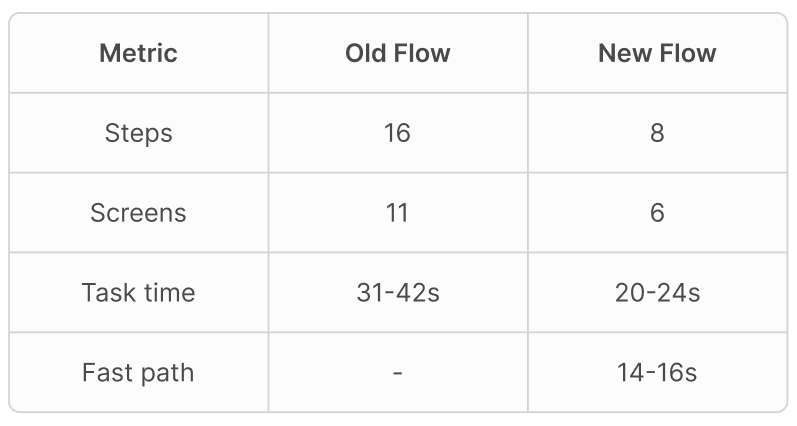
The redesign reduces task completion time by up to 60%
Outcomes
Key takeaways from this exploration
This experiment shows how AI tools can accelerate early UX exploration. Within two days, I was able to:
- Analyze an existing product
- Benchmark competitors
- Define a design concept
- Generate a prototype
- Estimate potential improvements
AI does not replace user testing or research. However, it dramatically reduces the time needed to move from problem identification to testable concept, enabling faster product conversations and hypothesis validation.
An existing design system and high-fidelity layouts would significantly improve AI-generated prototypes, enabling faster exploration and testing of targeted use cases.
Next areas of exploration
AI applied to Design Systems Foundations
Recently, I completed a Memorisely course on applying AI to design system foundations, scalability, and documentation.Next, I plan to explore building tokens (primitives and semantics), styles, base components and live documentation workflows using GPT, Token Studio, Figma Make, and Cursor.
Prompting design to higher fidelity
Another direction I want to explore is how far prompt-driven design can go in generating higher-fidelity interfaces and structured UI systems.
Expanding the AI toolkit
I’m also experimenting with additional tools such as Claude to understand how different AI models can support different stages of the UX process. The goal is to develop a flexible AI-augmented design workflow and learn which tools work best for each scenario.
Want to know more? Let’s connect
If you’d like to discuss this project or explore other work, feel free to reach out.
Get in touch
AI Exploration
Exploring AI-enhanced UX workflows
Using AI tools to rapidly analyze, redesign and prototype a banking app flow, in just 2 days.
AI workflows
Rapid prototyping
Prompt design
UX experimentation
Goal
Explore how AI can help redesign the flow and rapidly prototype a solution that reduces task completion time and perceived friction
Outcome
In just 2 days, I generated a mid-fidelity prototype entirely through AI prompting and used AI to estimate potential improvements.
AI Tools
Chat GPT, Figma Make, Lovable, UX Pilot(Cursor & Claude coming next)
This case study is an exploration of how AI tools can augment my UX process.
I’ve previously used AI in research, mainly to synthesize large datasets and interview insights. Recently, I began exploring broader AI workflows. To test this in practice, I chose a real problem I experience regularly: the Bizum payment flow in my banking app.
Bizum is designed to quickly send money to a phone contact, typically in social situations, like splitting a dinner bill. Yet in my bank’s app, the flow is slow, fragmented and full of unnecessary steps.
This made it the perfect scenario to test an AI-assisted redesign.
Day 1
Setting up an AI design assistant
To support the experiment, I created a custom GPT configured as a UX/Product design assistant, trained to apply:
- UX heuristic evaluation
- Product usability audits
- UX patterns analysis
- etc...
This assistant helped me structure prompts, analyze flows and generate design specifications throughout the process.
Discovery through AI analysis
I captured screenshots of the full Send Bizum flow from my banking app and fed them to the GPT assistant. I asked it to:
- Analyze the user journey
- Identify usability issues
- Highlight friction points
- Estimate time-to-task
This created a quick diagnostic of the experience.
AI UX Audit Summary
- Too many steps before the user can act.
- Constant interaction friction for main actions.
- Search is required, instead of being assisted by recents.
- Context switching: the SMS copy/paste step is a major interruption, forces users to leave the app.
Estimated task completion time
- 31-36 sec (without note) / 35-42 sec (with note)
Prompt-driven design
First result from the starting prompt
Iteration by prompt designing
AI-assisted ideation
Using the discovery insights, I prompted the assistant to:
- Benchmark leading banking apps like Revolut, N26, etc.
- Identify common UX patterns
- Suggest improvements for both the home screen and Bizum flow
From this, the AI proposed a redesigned concept focused on:
- Faster access to Bizum
- Streamlined transaction steps
- Reduced cognitive load
Generating the UI
To generate the interface, I worked through several rounds of prompt engineering. Because generative tools respond better to structured prompts, I iteratively refined the prompt to include:
- Layout instructions
- Interaction behaviour
- UI hierarchy and detailed specs
Once the prompt was ready, I used Figma Make to generate the design and iterated on it only by prompting on top of what the AI tool generated. Figma Make and other generative tools like Lovable or UX Pilot responds better when iterating in stages.
Day 2
Prototyping the Bizum flow
After generating the redesigned home screen, I repeated the process for the Bizum payment flow.
Using the GPT assistant, I created a detailed prompt describing:
- Each screen
- Interaction steps
- Reuse of components and consistent patterns
I then used Figma Make again to generate the full flow and iterated screen by screen until reaching a mid-fidelity prototype.
The full design and prototype were created entirely through prompting, no manual design work was done in Figma.
- You can try the prototype and follow the flow for sending a Bizum to one of your recurrent contacts -
Try prototype
Rapid AI validation experiment
To estimate potential improvements, I asked the GPT assistant to analyze the prototype and compare it to the original flow.It simulated the interaction and estimated:
- Time-to-task
- Step count
- Perceived friction
While this does not replace real user testing, it provides an early directional signal about potential impact, which can be valuable for product strategy discussions.
The redesign reduces task completion time by up to 60%
Outcomes
Key takeaways from this exploration
This experiment shows how AI tools can accelerate early UX exploration. Within two days, I was able to:
- Analyze an existing product
- Benchmark competitors
- Define a design concept
- Generate a prototype
- Estimate potential improvements
AI does not replace user testing or research. However, it dramatically reduces the time needed to move from problem identification to testable concept, enabling faster product conversations and hypothesis validation.
An existing design system and high-fidelity layouts would significantly improve AI-generated prototypes, enabling faster exploration and testing of targeted use cases.
Next areas of exploration
AI applied to Design Systems Foundations
Recently, I completed a Memorisely course on applying AI to design system foundations, scalability, and documentation.Next, I plan to explore building tokens (primitives and semantics), styles, base components and live documentation workflows using GPT, Token Studio, Figma Make, and Cursor.
Prompting design to higher fidelity
Another direction I want to explore is how far prompt-driven design can go in generating higher-fidelity interfaces and structured UI systems.
Expanding the AI toolkit
I’m also experimenting with additional tools such as Claude to understand how different AI models can support different stages of the UX process. The goal is to develop a flexible AI-augmented design workflow and learn which tools work best for each scenario.
Want to know more? Let’s connect
If you’d like to discuss this project or explore other work, feel free to reach out.
Get in touch
AI exploration
Using AI tools to rapidly analyze, redesign and prototype a banking app flow, in just 2 days.
AI workflows
Rapid prototyping
Prompt design
UX experimentation
Goal
Explore how AI can help redesign the flow and rapidly prototype a solution that reduces task completion time and perceived friction
Outcome
In just 2 days, I generated a mid-fidelity prototype entirely through AI prompting and used AI to estimate potential improvements.
AI Tools
Chat GPT, Figma Make, Lovable, UX Pilot(Cursor & Claude coming next)
This case study is an exploration of how AI tools can augment my UX process.
I’ve previously used AI in research, mainly to synthesize large datasets and interview insights. Recently, I began exploring broader AI workflows. To test this in practice, I chose a real problem I experience regularly: the Bizum payment flow in my banking app.
Bizum is designed to quickly send money to a phone contact, typically in social situations, like splitting a dinner bill. Yet in my bank’s app, the flow is slow, fragmented and full of unnecessary steps.
This made it the perfect scenario to test an AI-assisted redesign.
Day 1
Setting up an AI design assistant
To support the experiment, I created a custom GPT configured as a UX/Product design assistant, trained to apply:
- UX heuristic evaluation
- Product usability audits
- UX patterns analysis
- etc...
This assistant helped me structure prompts, analyze flows and generate design specifications throughout the process.
Discovery through AI analysis
I captured screenshots of the full Send Bizum flow from my banking app and fed them to the GPT assistant. I asked it to:
- Analyze the user journey
- Identify usability issues
- Highlight friction points
- Estimate time-to-task
This created a quick diagnostic of the experience.
AI UX Audit Summary
- Too many steps before the user can act.
- Constant interaction friction for main actions.
- Search is required, instead of being assisted by recents.
- Context switching: the SMS copy/paste step is a major interruption, forces users to leave the app.
Estimated task completion time
- 31-36 sec (without note) / 35-42 sec (with note)
Prompt-driven design
First result from the starting prompt
Iteration by prompt designing
AI-assisted ideation
Using the discovery insights, I prompted the assistant to:
- Benchmark leading banking apps like Revolut, N26, etc.
- Identify common UX patterns
- Suggest improvements for both the home screen and Bizum flow
From this, the AI proposed a redesigned concept focused on:
- Faster access to Bizum
- Streamlined transaction steps
- Reduced cognitive load
Generating the UI
To generate the interface, I worked through several rounds of prompt engineering. Because generative tools respond better to structured prompts, I iteratively refined the prompt to include:
- Layout instructions
- Interaction behaviour
- UI hierarchy and detailed specs
Once the prompt was ready, I used Figma Make to generate the design and iterated on it only by prompting on top of what the AI tool generated. Figma Make and other generative tools like Lovable or UX Pilot responds better when iterating in stages.
Day 2
Prototyping the Bizum flow
After generating the redesigned home screen, I repeated the process for the Bizum payment flow.
Using the GPT assistant, I created a detailed prompt describing:
- Each screen
- Interaction steps
- Reuse of components and consistent patterns
I then used Figma Make again to generate the full flow and iterated screen by screen until reaching a mid-fidelity prototype.
The full design and prototype were created entirely through prompting, no manual design work was done in Figma.
- You can try the prototype and follow the flow for sending a Bizum to one of your recurrent contacts -
Try prototype
Rapid AI validation experiment
To estimate potential improvements, I asked the GPT assistant to analyze the prototype and compare it to the original flow.It simulated the interaction and estimated:
- Time-to-task
- Step count
- Perceived friction
While this does not replace real user testing, it provides an early directional signal about potential impact, which can be valuable for product strategy discussions.
The redesign reduces task completion time by up to 60%
Outcomes
Key takeaways from this exploration
This experiment shows how AI tools can accelerate early UX exploration. Within two days, I was able to:
- Analyze an existing product
- Benchmark competitors
- Define a design concept
- Generate a prototype
- Estimate potential improvements
AI does not replace user testing or research. However, it dramatically reduces the time needed to move from problem identification to testable concept, enabling faster product conversations and hypothesis validation.
An existing design system and high-fidelity layouts would significantly improve AI-generated prototypes, enabling faster exploration and testing of targeted use cases.
Next areas of exploration
AI applied to Design Systems Foundations
Recently, I completed a Memorisely course on applying AI to design system foundations, scalability, and documentation.Next, I plan to explore building tokens (primitives and semantics), styles, base components and live documentation workflows using GPT, Token Studio, Figma Make, and Cursor.
Prompting design to higher fidelity
Another direction I want to explore is how far prompt-driven design can go in generating higher-fidelity interfaces and structured UI systems.
Expanding the AI toolkit
I’m also experimenting with additional tools such as Claude to understand how different AI models can support different stages of the UX process. The goal is to develop a flexible AI-augmented design workflow and learn which tools work best for each scenario.
Want to know more? Let’s connect
If you’d like to discuss this project or explore other work, feel free to reach out.
Get in touch