King
Automating manual operations to improve time to market
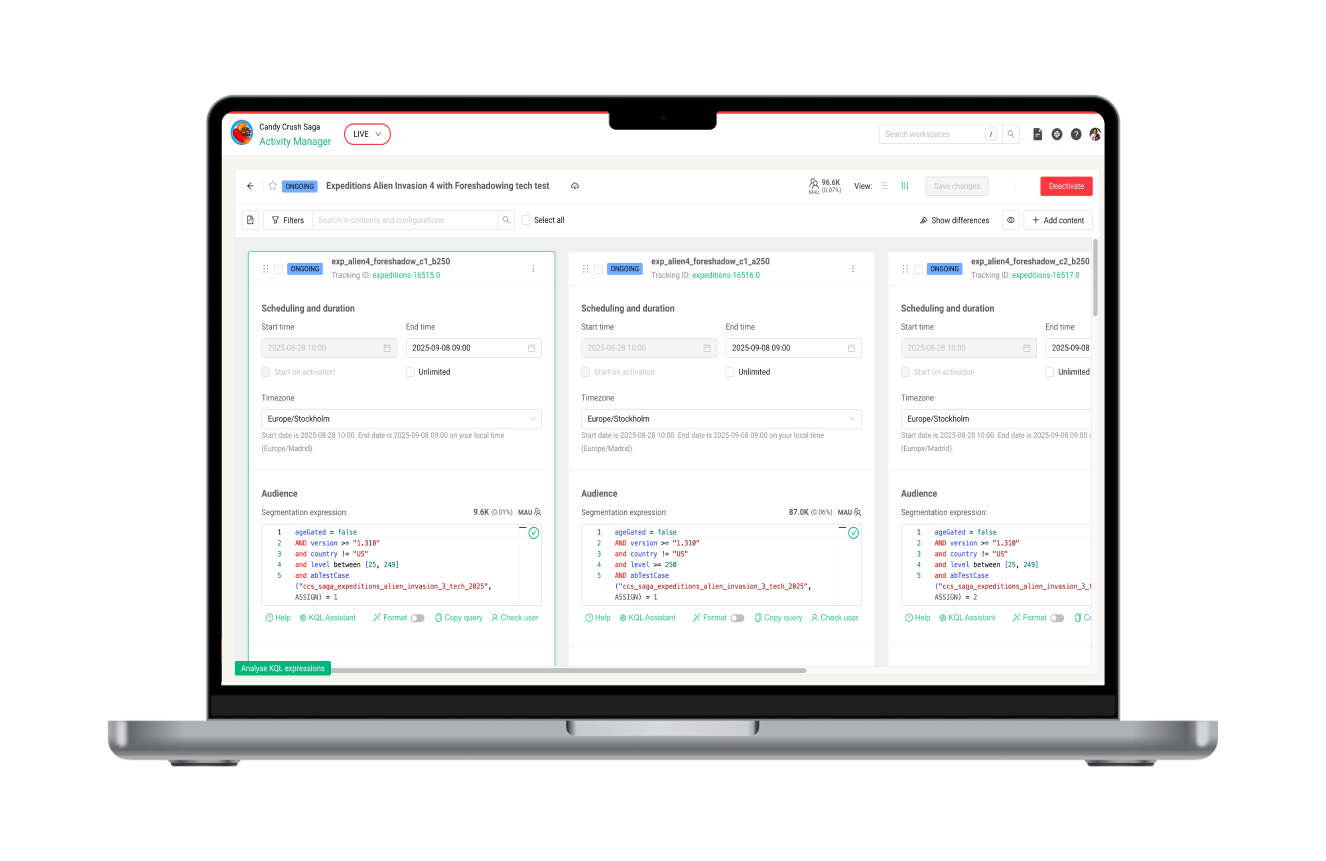
Reducing repetitive setup work and configuration errors in King’s Live Ops tooling through bulk actions and safer patterns.
Continuous discovery
Product growth
Complex ecosystem
B2B
Role
UX / Product designer (end-to-end)
Timeline
3 months end-to-end design + 3 months implementation & adoption - 2024/25
Platform
Web app, internal tools platform (UP)
Team
PM, EM, FE Devs, BE Devs, QA
Users
Live Game Events Operators
Constraints
UP dependencies, interconnected tools
King operates a SaaS gaming business model, delivering in-game events to millions of players worldwide. These experiences are configured through a complex ecosystem of interconnected internal tools owned by different teams.
As the UX designer responsible for improving the LiveOps toolset, I was tasked with designing an automation solution aligned with a company OKR: improve time to market by making event setup simpler, faster and safer.
25 to 50% reduction of manual inputs
Higher impact on more complex configurations
52% reduction of ops incidents
From 9.5% to 5%, reducing broken player experiences
10% less time from design to delivery
Across the full recurrent event setup flow
Problem
When operational complexity slows delivery
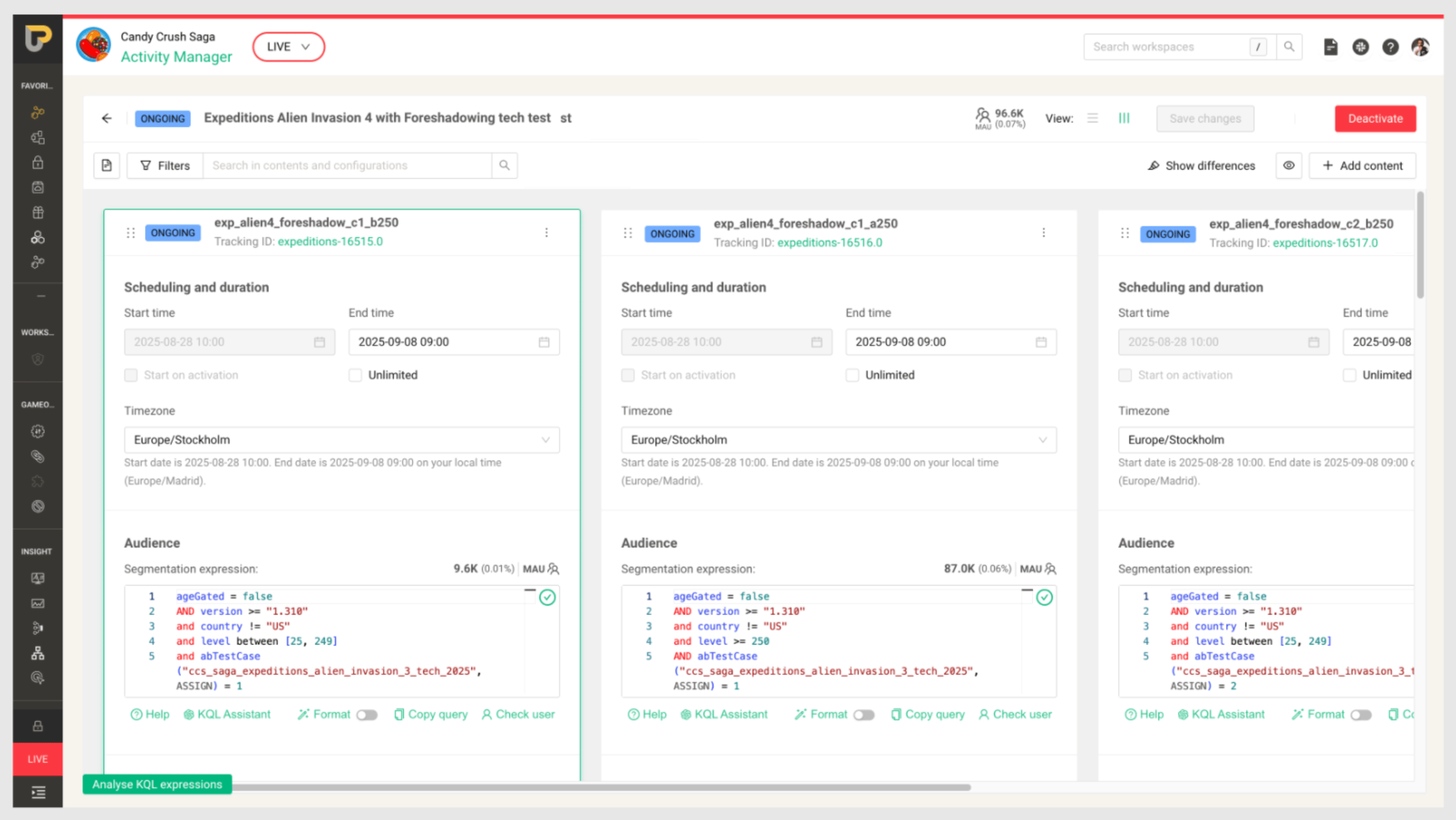
Events Manager tool. Each Content (column) displays a plugin configuration, defining the game event.
During 2024/25, one of King’s company OKRs was to improve time to market for game experiences.
Our team (LiveOps) owned a set of interconnected operational tools used to configure and run in-game events. The most critical one was the Events Manager, where Operators set up multiple plugin configurations and A/B tests before pushing them Live.
The operational setup journey:
Receive a briefing → Configure parameters across multiple tools → Run peer reviews and tests → Push the event live
As events complexity increased, so did setup time and the risk of configuration errors. For the LiveOps team, this translated into a clear goal: make event setup faster and safer.
Focusing the effort
Identifying where to intervene
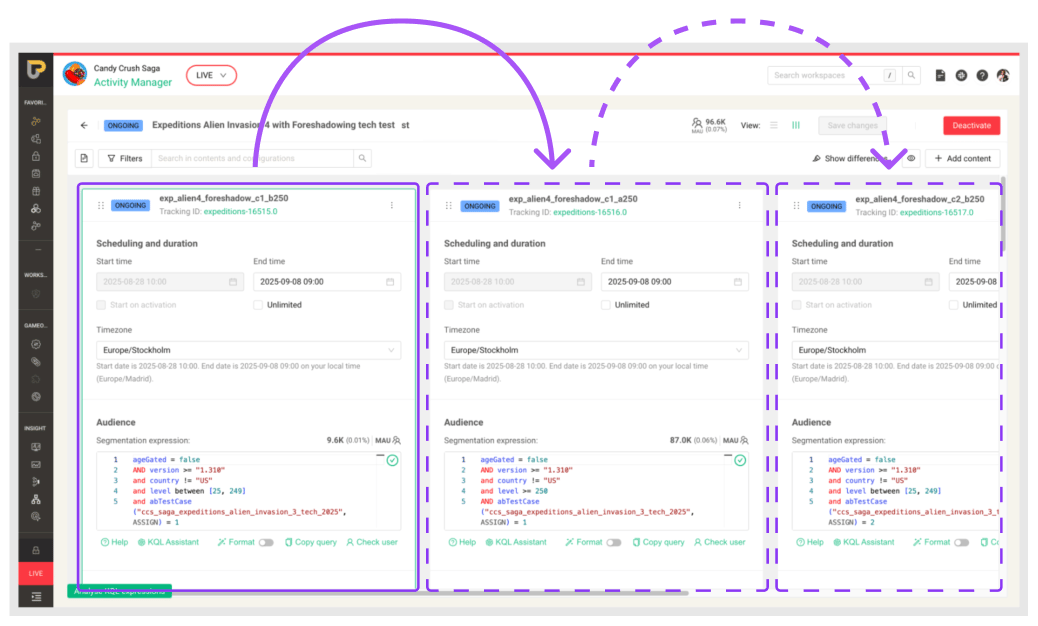
Operators manually updating each configuartion
Through continuous discovery, shadowing sessions with Operators and data review with Product and Engineering, we identified three major friction areas in the operational workflow:
- Complex briefings requiring extensive manual input and often containing inaccuracies.
- Fragmented workflows across poorly connected tools forcing context switching and duplicated inputs.
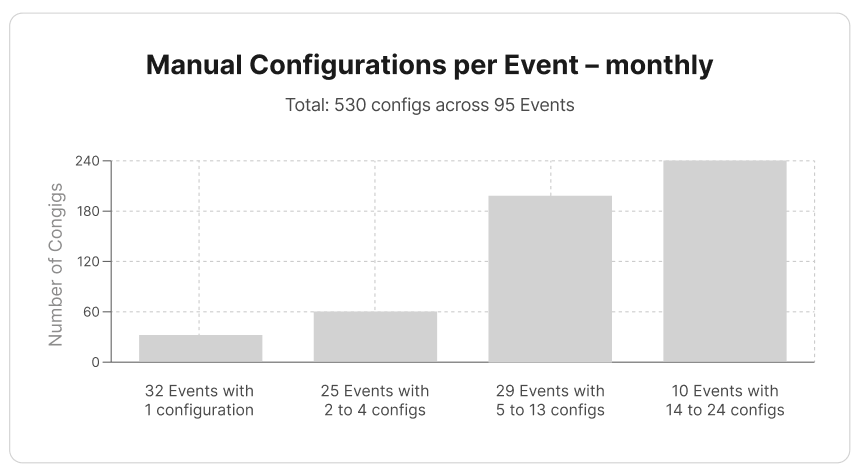
- Highly repetitive configuration tasks, especially for recurrent events or A/B test updates (≈90% of use cases). For recurrent events, operators manually reworked configuration contents weekly. The more complex the setup, the more repetition, drastically increasing setup time and hard-to-detect errors.
We aligned on scope. Addressing briefing complexity and cross-tool fragmentation required cross-team initiatives, so those were escalated into broader initiatives.
Event setup, however, was within our ownership, making it the most immediate opportunity to reduce manual repetition and improve operational efficiency.
Hypothesis
If we reduce repetitive manual configuration tasks during event setup, operators will complete setups faster and make fewer configuration errors.This should reduce operational incidents and improve time to market for player experiences.
From Discovery to Concept Assessment
Exploring automation solutions
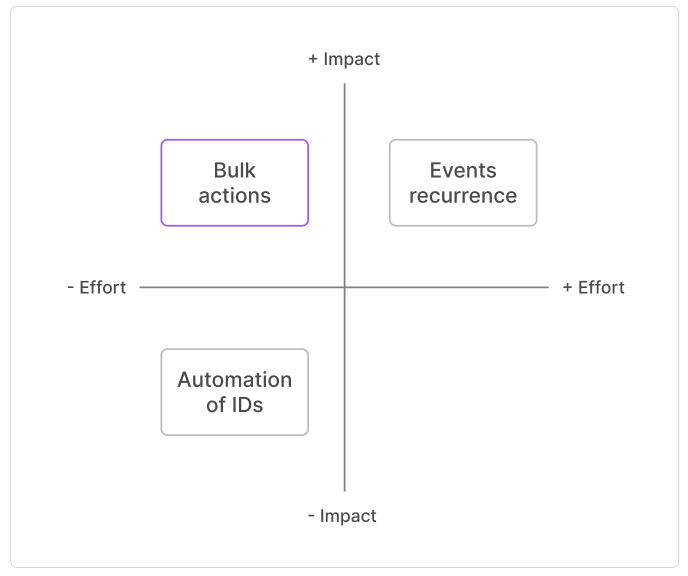
Based on these insights, I explored several automation directions and created lightweight concepts for:
- Bulk actions
- Events recurrence
- Automation of IDs
- Search and replace configuration values (discarded for technical reasons)
I facilitated a workshop with PM, EM, FE, BE and QA to assess these ideas using an impact/effort matrix. This surfaced constraints early and helped us align on where to invest.
We prioritised bulk actions as the most feasible solution with the highest user impact. The remaining ideas were added to the backlog.
Structuring the solution
Establishing a scalable bulk actions model
Mapping automation layers
To ensure consistency across the UP ecosystem, I benchmarked other internal tools that already supported bulk actions and aligned with their designers and PMs.
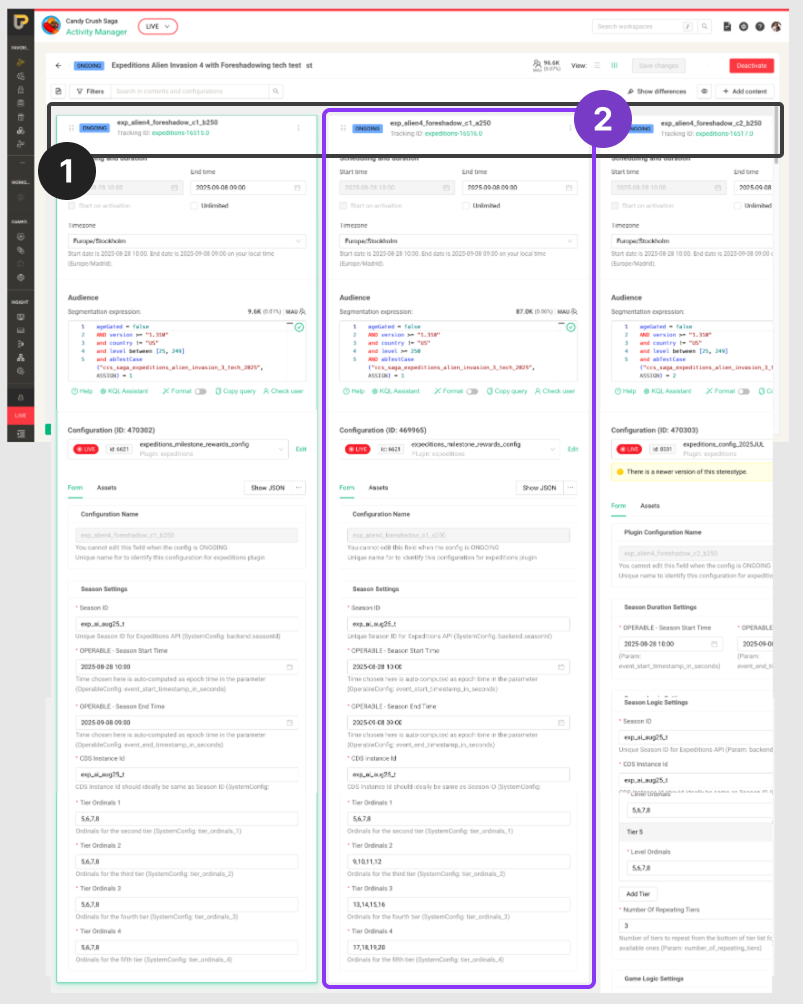
Within our tool, I identified two layers where bulk actions could deliver impact:
- Content level. Actions across multiple contents within an event (activate/deactivate, clone, delete , hide/show)
- Values level. Bulk editing configuration parameters, such as dates, input values and SQL lines
This breakdown allowed us to think about automation not as a single feature, but as a scalable interaction pattern.
Validating what to build first
To determine where to start, I ran a quick validation session using a low-fidelity prototype covering both layers.
The results were clear: bulk editing configuration values delivered the highest impact, particularly for dates and plugin configuration inputs. This was where friction and manual repetition accumulated the most. We focused on this as our starting point.
Iterative process
Defining the solution through validation
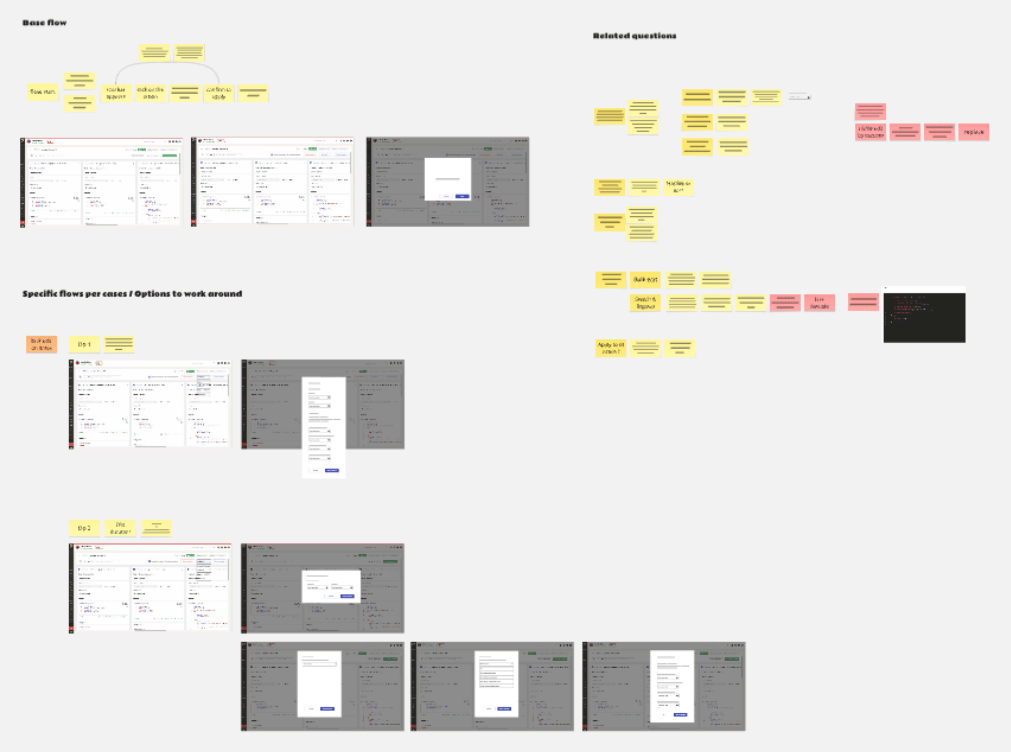
Co-designing with developers
The Events Manager tool had multiple dependencies across internal systems and legacy constraints.
To manage this complexity, I involved developers early through co-design sessions. Working in low fidelity, we surfaced edge cases, aligned on feasibility and iterated quickly toward a technically viable bulk edit flow.
This approach reduced risk and later rework before investing in high-fidelity design.
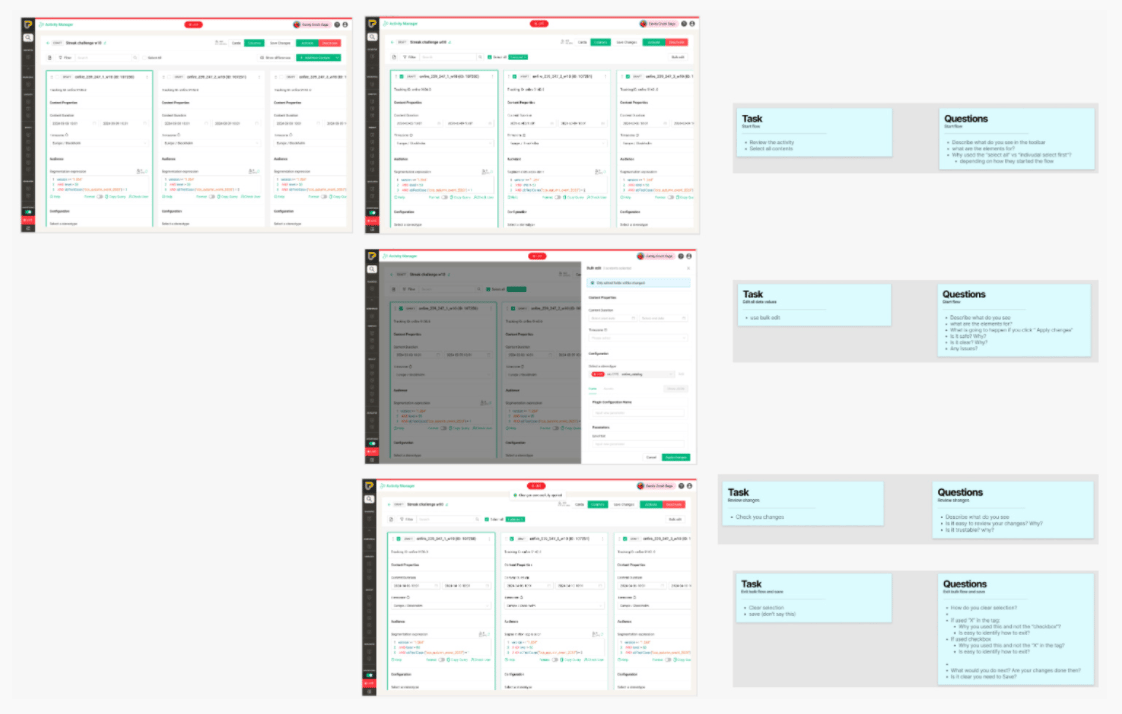
User testing sessions
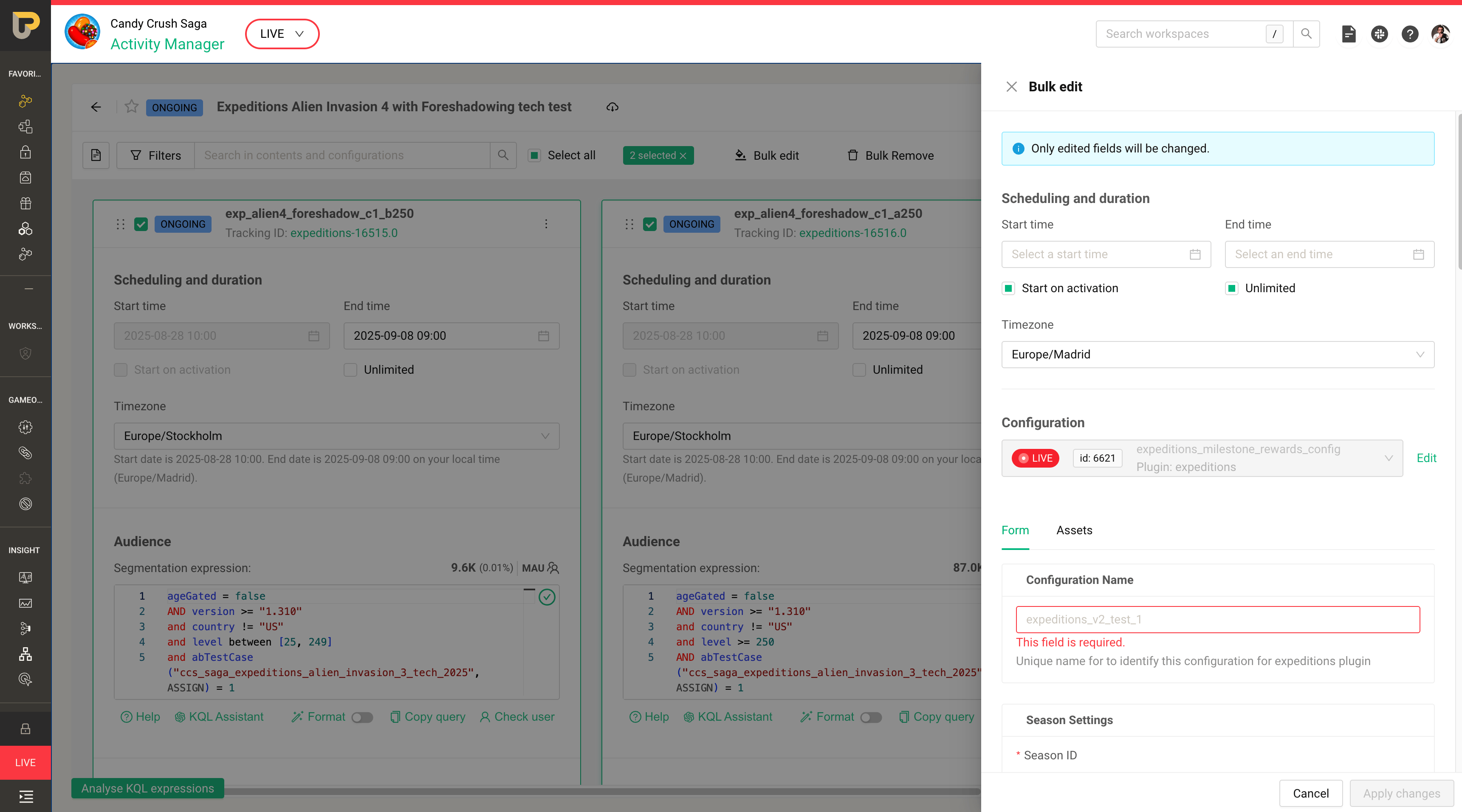
I designed two high-fidelity versions of the bulk edit flow and built clickable prototypes.
I ran five usability sessions with operators covering common scenarios, edge cases and error handling.
Based on their feedback, I made a deliberate decision between the two approaches and refined the selected solution into a polished final version.
Delivery
Shipping value incrementally
Delivering impact early
I presented the testing results to the team, explaining how user feedback shaped the final design. Due to development constraints, we agreed to split the solution into smaller releases to accelerate impact.
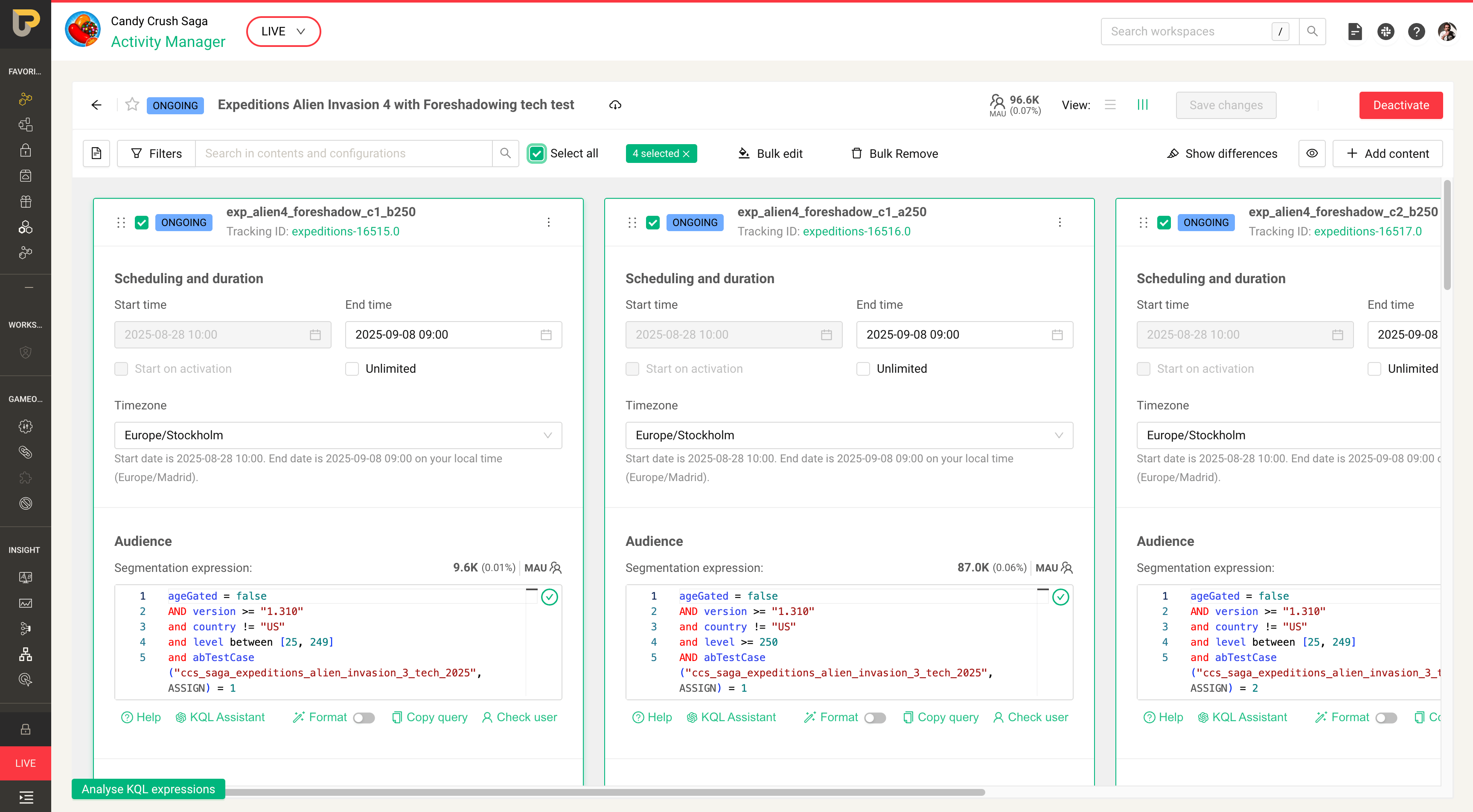
- Release 1. Individual select + Bulk Edit scheduling and duration.
- Release 2. Bulk Edit config values (same template).
- Release 3. Bulk Edit config values (different template).
- Release 4. Bulk Edit config values (versions) + Select all
The full bulk actions functionality was delivered in four incremental releases across multiple sprints. This allowed us to provide value early while continuing development.
Adoption and post-release feedback
Incremental releases and continuous discovery allowed us to gather feedback during adoption while development continued. This enabled parallel work streams: validating outcomes from released improvements while designing the remaining bulk actions.
Additional functionalities were added to the roadmap for future quarters.
Outcomes
Reducing friction and improving operability
These results validated our hypothesis: reducing manual repetition significantly improved both operational reliability and setup speed.
25 to 50% reduction of manual inputs
Impact varied by complexity: the more complex the setup, the greater the reduction, signalling major workflow impact on most critical use cases.
52% reduction of ops incidents
Fewer repeated inputs reduced typos and configuration errors, lowering incidents from 9.5% to 5%.This translated directly into less broken player experiences.
10% less time from design to delivery
Measured across the full recurrent event setup flow, from clone past event to Live.
Learnings
My takeaways designing for complex ecosystems
Strategy is a shared responsibility
Partnering early with Product and Engineering allowed us to define where to act with precision. Shared discovery conversations grounded decisions in real constraints and business priorities.
Shipping incrementally accelerates impact
Slicing the solution into smaller releases allowed us to deliver value earlier while reducing delivery risk. Progressive impact proved more effective than waiting for a complete solution.
Measure operational impact, not just usability
Connecting UX decisions to OKRs and tracking reductions in setup time, manual inputs and incidents ensured the impact of automation was visible and defensible. Metrics grounded the work in business value, not just usability improvements.
Want to know more? Let’s connect
If you’d like to discuss this project or explore other work, feel free to reach out.
Get in touch
King
Automating manual operations to improve time to market
Reducing repetitive setup work and configuration errors in King’s Live Ops tooling through bulk actions and safer patterns.
Continuous discovery
Product growth
Complex ecosystem
B2B
Role
UX / Product designer (end-to-end)
Timeline
3 months end-to-end design + 3 months implementation & adoption - 2024/25
Platform
Web app, internal tools platform (UP)
Team
PM, EM, FE Devs, BE Devs, QA
Users
Live Game Events Operators
Constraints
UP dependencies, interconnected tools
King operates a SaaS gaming business model, delivering in-game events to millions of players worldwide. These experiences are configured through a complex ecosystem of interconnected internal tools owned by different teams.
As the UX designer responsible for improving the LiveOps toolset, I was tasked with designing an automation solution aligned with a company OKR: improve time to market by making event setup simpler, faster and safer.
25 to 50% reduction of manual inputs
Higher impact on more complex configurations
52% reduction of ops incidents
From 9.5% to 5%, reducing broken player experiences
10% less time from design to delivery
Across the full recurrent event setup flow
Problem
When operational complexity slows delivery
Events Manager tool. Each Content (column) displays a plugin configuration, defining the game event.
During 2024/25, one of King’s company OKRs was to improve time to market for game experiences.
Our team (LiveOps) owned a set of interconnected operational tools used to configure and run in-game events. The most critical one was the Events Manager, where Operators set up multiple plugin configurations and A/B tests before pushing them Live.
The operational setup journey:
Receive a briefing → Configure parameters across multiple tools → Run peer reviews and tests → Push the event live
As events complexity increased, so did setup time and the risk of configuration errors. For the LiveOps team, this translated into a clear goal: make event setup faster and safer.
Focusing the effort
Identifying where to intervene
Operators manually updating each configuartion
Through continuous discovery, shadowing sessions with Operators and data review with Product and Engineering, we identified three major friction areas in the operational workflow:
- Complex briefings requiring extensive manual input and often containing inaccuracies.
- Fragmented workflows across poorly connected tools forcing context switching and duplicated inputs.
- Highly repetitive configuration tasks, especially for recurrent events or A/B test updates (≈90% of use cases). For recurrent events, operators manually reworked configuration contents weekly. The more complex the setup, the more repetition, drastically increasing setup time and hard-to-detect errors.
We aligned on scope. Addressing briefing complexity and cross-tool fragmentation required cross-team initiatives, so those were escalated into broader initiatives.
Event setup, however, was within our ownership, making it the most immediate opportunity to reduce manual repetition and improve operational efficiency.
Hypothesis
If we reduce repetitive manual configuration tasks during event setup, operators will complete setups faster and make fewer configuration errors.This should reduce operational incidents and improve time to market for player experiences.
From Discovery to Concept Assessment
Exploring automation solutions
Based on these insights, I explored several automation directions and created lightweight concepts for:
- Bulk actions
- Events recurrence
- Automation of IDs
- Search and replace configuration values (discarded for technical reasons)
I facilitated a workshop with PM, EM, FE, BE and QA to assess these ideas using an impact/effort matrix. This surfaced constraints early and helped us align on where to invest.
We prioritised bulk actions as the most feasible solution with the highest user impact. The remaining ideas were added to the backlog.
Structuring the solution
Establishing a scalable bulk actions model
Mapping automation layers
To ensure consistency across the UP ecosystem, I benchmarked other internal tools that already supported bulk actions and aligned with their designers and PMs.
Within our tool, I identified two layers where bulk actions could deliver impact:
- Content level. Actions across multiple contents within an event (activate/deactivate, clone, delete , hide/show)
- Values level. Bulk editing configuration parameters, such as dates, input values and SQL lines
This breakdown allowed us to think about automation not as a single feature, but as a scalable interaction pattern.
Validating what to build first
To determine where to start, I ran a quick validation session using a low-fidelity prototype covering both layers.
The results were clear: bulk editing configuration values delivered the highest impact, particularly for dates and plugin configuration inputs. This was where friction and manual repetition accumulated the most. We focused on this as our starting point.
Iterative process
Defining the solution through validation
Co-designing with developers
The Events Manager tool had multiple dependencies across internal systems and legacy constraints.
To manage this complexity, I involved developers early through co-design sessions. Working in low fidelity, we surfaced edge cases, aligned on feasibility and iterated quickly toward a technically viable bulk edit flow.
This approach reduced risk and later rework before investing in high-fidelity design.
User testing sessions
I designed two high-fidelity versions of the bulk edit flow and built clickable prototypes.
I ran five usability sessions with operators covering common scenarios, edge cases and error handling.
Based on their feedback, I made a deliberate decision between the two approaches and refined the selected solution into a polished final version.
Delivery
Shipping value incrementally
Delivering impact early
I presented the testing results to the team, explaining how user feedback shaped the final design. Due to development constraints, we agreed to split the solution into smaller releases to accelerate impact.
- Release 1. Individual select + Bulk Edit scheduling and duration.
- Release 2. Bulk Edit config values (same template).
- Release 3. Bulk Edit config values (different template).
- Release 4. Bulk Edit config values (versions) + Select all
The full bulk actions functionality was delivered in four incremental releases across multiple sprints. This allowed us to provide value early while continuing development.
Adoption and post-release feedback
Incremental releases and continuous discovery allowed us to gather feedback during adoption while development continued. This enabled parallel work streams: validating outcomes from released improvements while designing the remaining bulk actions.
Additional functionalities were added to the roadmap for future quarters.
Outcomes
Reducing friction and improving operability
These results validated our hypothesis: reducing manual repetition significantly improved both operational reliability and setup speed.
25 to 50% reduction of manual inputs
Impact varied by complexity: the more complex the setup, the greater the reduction, signalling major workflow impact on most critical use cases.
52% reduction of ops incidents
Fewer repeated inputs reduced typos and configuration errors, lowering incidents from 9.5% to 5%.This translated directly into less broken player experiences.
10% less time from design to delivery
Measured across the full recurrent event setup flow, from clone past event to Live.
Learnings
My takeaways designing for complex ecosystems
Strategy is a shared responsibility
Partnering early with Product and Engineering allowed us to define where to act with precision. Shared discovery conversations grounded decisions in real constraints and business priorities.
Shipping incrementally accelerates impact
Slicing the solution into smaller releases allowed us to deliver value earlier while reducing delivery risk. Progressive impact proved more effective than waiting for a complete solution.
Measure operational impact, not just usability
Connecting UX decisions to OKRs and tracking reductions in setup time, manual inputs and incidents ensured the impact of automation was visible and defensible. Metrics grounded the work in business value, not just usability improvements.
Want to know more? Let’s connect
If you’d like to discuss this project or explore other work, feel free to reach out.
Get in touch
King
Reducing repetitive setup work and configuration errors in King’s Live Ops tooling through bulk actions and safer patterns.
Continuous discovery
Product growth
Complex ecosystem
B2B
Role
UX / Product designer (end-to-end)
Timeline
3 months end-to-end design + 3 months implementation & adoption - 2024/25
Platform
Live Game Events Operators
Team
PM, EM, FE Devs, BE Devs, QA
Users
Live Game Events Operators
Constraints
UP dependencies, interconnected tools
King operates a SaaS gaming business model, delivering in-game events to millions of players worldwide. These experiences are configured through a complex ecosystem of interconnected internal tools owned by different teams.
As the UX designer responsible for improving the LiveOps toolset, I was tasked with designing an automation solution aligned with a company OKR: improve time to market by making event setup simpler, faster and safer.
25 to 50% reduction of manual inputs
Higher impact on more complex configurations
52% reduction of ops incidents
From 9.5% to 5%, reducing broken player experiences
10% less time from design to delivery
Across the full recurrent event setup flow
Problem
When operational complexity slows delivery
Events Manager tool. Each Content (column) displays a plugin configuration, defining the game event.
During 2024/25, one of King’s company OKRs was to improve time to market for game experiences.
Our team (LiveOps) owned a set of interconnected operational tools used to configure and run in-game events. The most critical one was the Events Manager, where Operators set up multiple plugin configurations and A/B tests before pushing them Live.
The operational setup journey:
Receive a briefing → Configure parameters across multiple tools → Run peer reviews and tests → Push the event live
As events complexity increased, so did setup time and the risk of configuration errors. For the LiveOps team, this translated into a clear goal: make event setup faster and safer.
Focusing the effort
Identifying where to intervene
Through continuous discovery, shadowing sessions with Operators and data review with Product and Engineering, we identified three major friction areas in the operational workflow:
- Complex briefings requiring extensive manual input and often containing inaccuracies.
- Fragmented workflows across poorly connected tools forcing context switching and duplicated inputs.
- Highly repetitive configuration tasks, especially for recurrent events or A/B test updates (≈90% of use cases). For recurrent events, operators manually reworked configuration contents weekly. The more complex the setup, the more repetition, drastically increasing setup time and hard-to-detect errors.
We aligned on scope. Addressing briefing complexity and cross-tool fragmentation required cross-team initiatives, so those were escalated into broader initiatives.
Event setup, however, was within our ownership, making it the most immediate opportunity to reduce manual repetition and improve operational efficiency.
Operators manually reworked each configuration weekly, up to 24 times for complex events.
Hypothesis
If we reduce repetitive manual configuration tasks during event setup, operators will complete setups faster and make fewer configuration errors.This should reduce operational incidents and improve time to market for player experiences.
From Discovery to Concept Assessment
Exploring automation solutions
Based on these insights, I explored several automation directions and created lightweight concepts for:
- Bulk actions
- Events recurrence
- Automation of IDs
- Search and replace configuration values (discarded for technical reasons)
I facilitated a workshop with PM, EM, FE, BE and QA to assess these ideas using an impact/effort matrix. This surfaced constraints early and helped us align on where to invest.
We prioritised bulk actions as the most feasible solution with the highest user impact. The remaining ideas were added to the backlog.
Structuring the solution
Establishing a scalable bulk actions model
Mapping automation layers
To ensure consistency across the UP ecosystem, I benchmarked other internal tools that already supported bulk actions and aligned with their designers and PMs.
Within our tool, I identified two layers where bulk actions could deliver impact:
- Content level. Actions across multiple contents within an event (activate/deactivate, clone, delete , hide/show)
- Values level. Bulk editing configuration parameters, such as dates, input values and SQL lines
This breakdown allowed us to think about automation not as a single feature, but as a scalable interaction pattern.
Validating what to build first
To determine where to start, I ran a quick validation session using a low-fidelity prototype covering both layers.
The results were clear: bulk editing configuration values delivered the highest impact, particularly for dates and plugin configuration inputs. This was where friction and manual repetition accumulated the most. We focused on this as our starting point.
Iterative process
Defining the solution through validation
Co-designing with developers
The Events Manager tool had multiple dependencies across internal systems and legacy constraints.
To manage this complexity, I involved developers early through co-design sessions. Working in low fidelity, we surfaced edge cases, aligned on feasibility and iterated quickly toward a technically viable bulk edit flow.
This approach reduced risk and later rework before investing in high-fidelity design.
User testing sessions
I designed two high-fidelity versions of the bulk edit flow and built clickable prototypes.
I ran five usability sessions with operators covering common scenarios, edge cases and error handling.
Based on their feedback, I made a deliberate decision between the two approaches and refined the selected solution into a polished final version.
Delivery
Shipping value incrementally
Delivering impact early
I presented the testing results to the team, explaining how user feedback shaped the final design. Due to development constraints, we agreed to split the solution into smaller releases to accelerate impact.
- Release 1. Individual select + Bulk Edit scheduling and duration.
- Release 2. Bulk Edit config values (same template).
- Release 3. Bulk Edit config values (different template).
- Release 4. Bulk Edit config values (versions) + Select all
The full bulk actions functionality was delivered in four incremental releases across multiple sprints. This allowed us to provide value early while continuing development.
Adoption and post-release feedback
Incremental releases and continuous discovery allowed us to gather feedback during adoption while development continued. This enabled parallel work streams: validating outcomes from released improvements while designing the remaining bulk actions.
Additional functionalities were added to the roadmap for future quarters.
Outcomes
Reducing friction and improving operability
These results validated our hypothesis: reducing manual repetition significantly improved both operational reliability and setup speed.
25 to 50% reduction of manual inputs
Impact varied by complexity: the more complex the setup, the greater the reduction, signalling major workflow impact on most critical use cases.
52% reduction of ops incidents
Fewer repeated inputs reduced typos and configuration errors, lowering incidents from 9.5% to 5%.This translated directly into less broken player experiences.
10% less time from design to delivery
Measured across the full recurrent event setup flow, from clone past event to Live.
Learnings
My takeaways designing for complex ecosystems
Strategy is a shared responsibility
Partnering early with Product and Engineering allowed us to define where to act with precision. Shared discovery conversations grounded decisions in real constraints and business priorities.
Shipping incrementally accelerates impact
Slicing the solution into smaller releases allowed us to deliver value earlier while reducing delivery risk. Progressive impact proved more effective than waiting for a complete solution.
Measure operational impact, not just usability
Connecting UX decisions to OKRs and tracking reductions in setup time, manual inputs and incidents ensured the impact of automation was visible and defensible. Metrics grounded the work in business value, not just usability improvements.
Want to know more? Let’s connect
If you’d like to discuss this project or explore other work, feel free to reach out.
Get in touch